
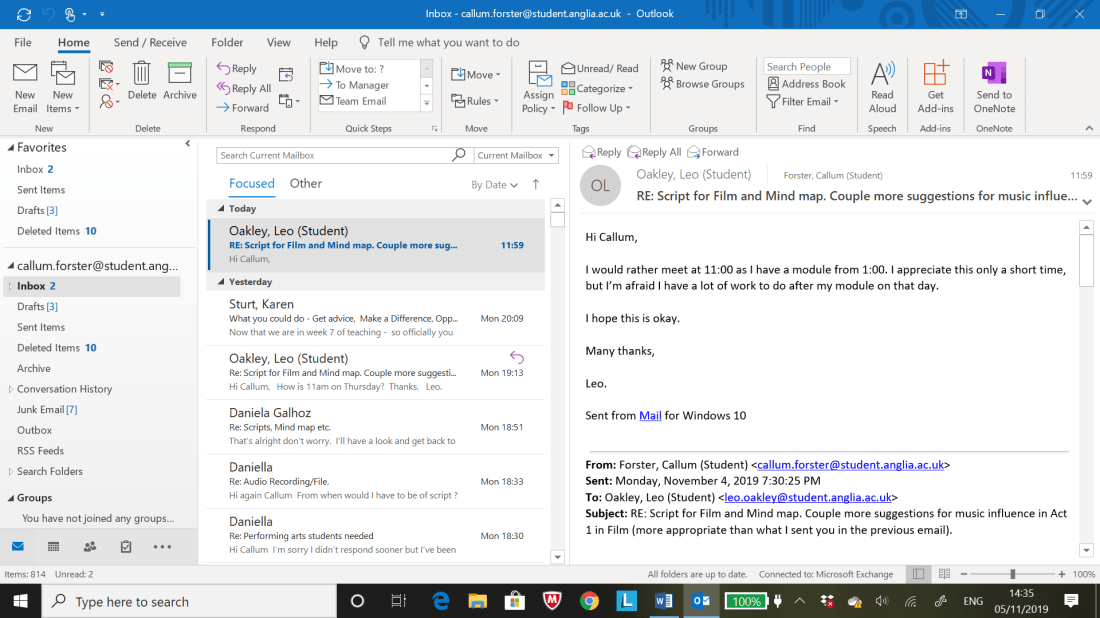
Emails between myself and Adina;


Emails between myself and Tani;


Messages between myself and Max;


Sketchbook Pages (Experimenting with FX of edited for Act 1 and 2);


Behind the Scenes Photos taken during the Location and Studio Shoots with added Screenshots (Location Photos taken by Adina Cojocaru);


Screenshots that can be seen below showcase the final edits on the interactive film Groundless;
Final Storyboard Layout Colour Coded to differentiate Home Page, Acts 1 and 2 etc:


Groundless Home Page with the use of a modified ‘Play Button’ to start the Interactive Film with the Font ‘Crimson Text’ at size ‘112’. The font and size was chosen to mick the original titles font in capital letters as possible. The Font ‘Crimson Text’ and the ‘Play Button’ is used throughout the film during the options scenes.


Four Screenshots below highlight the Options Sequences found within the Interactive Film ‘Groundless’. The ‘Play Buttons’ light up when the mouse hovers over the arrow symbol to transition the scene to the players preferred choice of narrative direction:


- The Final Interactive Film ‘GROUNDLESS’ lasts for about ‘7 Minutes and 2 seconds (07:02:10)’ after compiling footage on Premier Pro for both Acts 1 and 2.
Final Screenshot below depicts the methods used to make the scenes flow from one sequence to another as well as make the ‘Play Button’ function when selected so the sequence morphs into the appropriate ‘option’ the ‘play button’ represents:

To make a scene flow from one sequence to another the button ‘Arrow’ button present in the ‘Buttons’ section on the right hand side of the Klynt Programme, once said button is selected go to the ‘Button Properties’ box on the right and select ‘Link’.
Then click on ‘Go To: ‘ section and select preferred sequence to follow after current sequence. Finally tick off ‘Automatic Transition’ so the ‘Arrow’ Button disappears and set the ‘Transition’ section to ‘Fade’. A little box should appear opposite the Footage (Green) selected prior he tweaks mentioned throughout.
This step by step can be applied to the ‘Options Buttons’ with the difference being the ‘Options’ themselves being selected and tweaked on the ‘Button Properties’ Box rather than the footage (green).
Final Thoughts on Interactive Narratives Module (Critical Evaluation);
The positives that I can draw from the final piece for the Interactive Narratives modules as well as my general thoughts overall is the how well and polished the final edited assets (MP4 Clips) were with the initial idea, in my opinion, being realised to its fullest which initially in the early stages of the module I thought I was not going to be able to get certain people in to contribute to the Interactive film as seen in the earlier blogs for Trimester 2.
The only negatives that I can bring up in hindsight after completing the final interactive film is the unpredictability and lack of available from people who are willing to contribute their skills to the film which proved difficult due to the filming schedules and the finalising of details only being completed halfway through the module.
At that time other courses within the university were preoccupied with their own work, if I didn’t create a ‘StarNow’ account or put up posters across the university I wouldn’t have been able to have gathered the team and resources needed for the film to be put together. I sincerely wish to thank all the people within and outside the university who helped bring this interactive film to life which I couldn’t have produced on my own.
Improvements that would be implemented if I was given the opportunity to create an Interactive Film again is to be more strict on completing the pre-production stages at a swift pace as well as put up callouts on the internet and physical posters within or outside the university so I have a better chance of refining the final film. I’ll try to retain collaborators on the film early in development as I was very, very lucky to have got a small crew together before shooting commenced on both Acts of the film.
Activities that would accompany the refining process mentioned in the previous paragraph is incorporating extra elements like a ‘timer’ to the option sequences, so the audience are encouraged to choose an option rather than take their time. More time would provide extra tweaks and features to the film on the Klynt program which has many facets that would make the film more interactive which was ultimately not used due to lack of time and the focus on completing the basics that were taught in earlier sessions during the module.
 Email Exchange between myself and Tani (Composer);


![69382141_2478139089076628_2353318473897082880_o[2]](https://i0.wp.com/callumforster.home.blog/wp-content/uploads/2019/11/69382141_2478139089076628_2353318473897082880_o2.jpg?w=546&h=546&crop=1&ssl=1 "69382141_2478139089076628_2353318473897082880_o[2]")
![ARU-Logo[1]](https://i0.wp.com/callumforster.home.blog/wp-content/uploads/2019/11/aru-logo1.png?w=546&h=546&crop=1&ssl=1 "ARU-Logo[1]")


![3]](https://i0.wp.com/callumforster.home.blog/wp-content/uploads/2019/11/3-5.png?w=250&h=445&ssl=1 "3]")


![[3]](https://i0.wp.com/callumforster.home.blog/wp-content/uploads/2019/11/3-13.jpg?w=624&h=832&ssl=1 "[3]")


![unnamed[1]](https://i0.wp.com/callumforster.home.blog/wp-content/uploads/2019/11/unnamed1.jpg?w=541&h=801&ssl=1 "unnamed[1]")




 Callum Forster