Video Tutorial. Post-Production. Week 11.

The extra videos and images depicted below in ‘Harvard Reference’ were thought up during the late Post-Production of the Second Tutorial with the main reasoning stemming from enhancing the humour within the video as well as make it more engaging as the edited recorded sequence prove not to carry all of the video and needs assistance with the cut away gags to keep the upbeat energy the video evokes.
12lenlen, 2009. I Love To Singa- Owl. Available at:
<https://www.youtube.com/watch?v=zj1FifK3bbg&gt; [Accessed 13 April 2019].

‘I love to Singa’ to be placed after line ‘That’s about it MATE!’ before continuing the recorded dialogue after short cutaway.

Gromland, 2008. bbc-220colour20test20card20f20v_v_g20201967. [image online] Available at:
<https://gromland.wordpress.com/2008/10/22/el-81-de-los-espanoles-cree-que-falete-no-existe-sparky-informa/&gt; [Accessed 13 April 2019].

Placard (BBC TEST Placard) will be set after line ‘what’s your story’ with my ‘Spike Milligan-esque’ noises playing over it. Distorted Photoshop image of ‘Ron’ can be put within the circle that contains the girl and toy clown for a brief second. This will be before ‘Eric the half a bee’ mock singing. ‘Spike Milligan-esque’ noise will come from ‘Lincolndale 3’ recording.

‘Static’ Clips will still be used to indicate transitions between video and image alike. The First Tutorial will be played within the Second Tutorial in ‘Reverse’ over the ‘Edited Recorded Dialogue’ with the quality of the footage tweaked to the Second Tutorial to look more engaging and experimental with the approaches ‘Premier Pro’ can offer.

Monty Pythons ‘SPAM’ Sketch might also appear as a blip that interrupts the edited recordings I done beforehand, the space between ‘1.23-1.49’ will be used for video tutorial referencing for clip can be seen below (Showing clear recognition of who it belongs to). Clips plays after line ‘Want know about anyone else’s absence?’ (Clip Tweaked so German Subtitles are not present):
Lucas Gomes, 2014. Monty Python SPAM. Available at:
<https://www.youtube.com/watch?v=_bW4vEo1F4E&gt; [Accessed 14 April 2019].

All ‘Harvard References’ will be presented at the End Credits of the ‘Second Tutorial’.

bbc-220colour20test20card20f20v_v_g20201967[1]

The screenshots below showcase the basic layout of the First Tutorial I produced for this project;


Video produced in previous Semester (Above) incorporated in ‘First Tutorial’ as a recommended video, linking to overlooking what YouTube Videos normally present at the end of their content.

Screenshots (Below) show further tweaks in how certain effects were achieved on existing footage as well as the rough layout of the final edited tutorial labelled ‘Humorous’.


Two video links below are there so I can refresh on how to achieve Subtitles on Premier Pro as well as how to Adjust Sound, Amplitude etc.
Orange83, 2017. CAPTIONS and SUBTITLES tutorial for Premier Pro. Available at:
<https://www.youtube.com/watch?v=ZhHG4f-9MBY&gt; [Accessed 16 April 2019].
(Subtitles above), (Voice Pitch Below)
Orange83, 2019. Change pitch for a HIGH or DEEP/LOW voice in Premier Pro. Available at: <https://www.youtube.com/watch?v=b3B3NMGh8B0&gt; [Accessed 16 April 2019].

After showing Jacob (Fellow Colleague in the Digital Media Course) the ‘Rough Edit’ of my ‘Humorous Tutorial’, the one critique that he put forward was to apply ‘Subtitles’ over the footage and recorded audio as it will create a more focused presentation as well as allow the audience to better understand what is going on. This point I will apply for the final edits. The font/colour variants for the five characters in question can be seen below (This is done so each character is identifiable which could be lost if all the subtitles are the same font/colour);

REGINALD LINCOLNDALE (Franklin Gothic Heavy, Red)
CECIL (Cooper Black, Light Green)
ARMANDIA (Forte, Purple)
GEOFFREY (Britannic Bold, Orange)
GERALD (Gills Sans Ultra Bold, Yellow)
GEORGE (Eras Bold ITC, Blue)

Colour Scheme could change but what is seen above will be applied to final ‘Humorous Tutorial’. Subtitles throughout 13 Minute Tutorial will vary in size and position throughout lining up the anarchic set up brought forward through the edited recordings I done several weeks prior. The recordings will also be tweaked in pitch, incorporating both high and low to mimic the broken, glitchy video aesthetic that I tried to replicate throughout the ‘Humorous Tutorial’.

Screenshots below showcase Fonts and Colours for the Individual Characters ‘Subtitles’ which will applied throughout the 13 minute run time;


Two versions of the ‘humorous’ tutorial will be produced for the project. One with the added clips and images from the internet and the other without said clips and images. This is so the second variant of the tutorial can be posted on YouTube without the risk of infringing copyright while also keeping the original tutorial that was planned out in Pre-Production.

Final Clip that will be applied to 13-minute video from YouTube will the application of the ‘Beep Noise’ often used for censoring swear words. This will be applied as it adds a bit more humour to video and maintain the viewers interest which I felt would be lacking without it (It also felt like the best course of action in case there is criticism with the swearing, therefore limiting the videos chances of being presented on YouTube). Harvard Reference can be seen below;

Sound Effects, 2017. FREE “Censor Beep” Sound Effect [High Quality]. Available at: <https://www.youtube.com/watch?v=HnubI6M-eL4&gt; [Accessed 23 April 2019].
‘Ron’s Face’ will also be applied during the ‘Boat Sequence’ within the ‘Monty Pythons SPAM’ sketch at half opacity, briefly appearing and disappearing during the duration of said sequence. This is applied to add consistency and uniformity to the entire video as well continue the reoccurring joke of ‘Ron’s Face’ appearing at various points throughout the video, dominating and interrupting the flow of the said video during the scripted sections and the cut away gags.


Week 12 Feedback;

After receiving feedback on the first tutorial from the class including Tina (Main Tutor) the main point that was clearly addressed early on which I later applied to the second edit was to clearly showcase the finished final outcomes of the method I`m teaching ‘first’ before I teach the method throughout the tutorial which I did not take into account when I created the original video.
I applied the three tweaked final outcomes that were created using the method I taught within the tutorial at the very beginning with subtitles before and after the said three adjusted pieces to clearly explain what the three related images are as well as give the audience/viewer a clear understanding what their final piece of work should look like instead the audience/viewer skipping through all 13 minutes so they briefly see the final outcome.

The four screenshots that can be seen below showcase that added three pieces of work that link to the method taught within the video with added text as explained in the previous paragraph;


Reflection upon the ‘Humorous Tutorial’;
After some reflection upon the 13 minute comic tutorial I produced for the ‘Video Tutorial Project’, it has become evident to me that the aspects that I would’ve changed or reconsidered if I was given another opportunity to do a video in the same vein is to make the scripted video no longer than 5 or 6 minutes which proved to be a massive detriment to the original 13 minute video. The 13 minutes being too long and dialogue heavy leading to the next point of including more interesting events and situations, both verbally and visually, as the subtitles could only provide so much to a scripted comic video after a certain period.

Key Screenshots of the ‘Humorous Tutorial’ can be seen below depicting the finished outcome;


I will consider recording lines from a fixed position in the future as production and post-production was made very difficult due to myself shouting near and far from the mic, creating a lot of wasted time trying to adjust the volume to ensure that all the video played at the same pitch.

WARNING Notice before beginning of video=

After working upon the video over the weeks the project was given it became apparent after further editing that despite the adjustments made to the volume, it still fluctuates from high to low which proves to be a big problem considering the video will have to be heard on headphones as well as played out loud in a room.
I provided a ‘WARNING’ at the beginning of the video explain this problematic quirk that is present throughout the video due to the way I utilised the speaker during the original recordings, this saves any problems in the future regarding loud sections which even took me aback initially when I started editing the video together. The screenshot that can be seen below showcases the WARNING placed before the beginning of the humorous tutorial;

Screen Shot 2019-05-01 at 16.57.49

Change of Plan regarding the initial Third Video/Edit of the Humorous Tutorial;
After receiving feedback mixed with consideration on my part during the last few weeks before the projects end, I finally decided to push forward with the ‘One Minute Trailer’ idea rather than the safe, original ‘Copyright Free’ edit I had in mind for the humorous tutorial.

I decided this as it would be nice to add a third video to the collection produced for this project. I also feel confident in the existing footage providing enough clips to be edited together to create a fun, manic piece. It would also feel a shame not to attempt this as the moment it was suggested the structure and outcome of the potential video had formulated in my head which I feel should be applied while its still fresh in my memory.

The Chinese words that can be seen below are what were used for the final trailer with the original English word opposite it. The site I used to translate the words from English to Chinese is also depicted below in Harvard Reference;

朗恩= Ron
幽默= Humorous
指南= Tutorial

MDBG, 2019. Translate-MDGB Chinese Dictionary. [online] Available at:
<https://www.mdbg.net/chinese/dictionary?page=translate&gt; [Accessed 02 May 2019].

The title of my second tutorial will be ‘Ron Humorous Tutorial’ as it sums up the themes and traits found within the video itself as well as being a neat title for the trailer I produced that incorporates the Chinese language rather than English (Although the English Language is included anyway to complete the sequence presented within the one minute and eight second video).

Two Photos below showcase the early Storyboard and Notes produced for the ‘Trailer’ with specific decisions and creative choices highlighted in pen within my ‘Digital Media Design’ Sketchbook;


Key Screenshots of the ‘Trailer for the Humorous Tutorial’ can be seen below depicting the finished outcome;


Video Tutorial. Production. Week 10.

The Three images that can be seen below showcase the final attempt/demonstration of the ‘Cool Watercolour Effect’ on Photoshop for the Video Tutorial which this post which this post will greatly expand upon during its ‘Production’ Phase.

I will attempt to create two videos for this project (This sentence written on 02/04/19). The First focusing on the ‘Cool Watercolour Effect’ step by step as seen above condensed in a 15 minute video akin to a YouTube video. The Second Video will incorporate the ‘Humorous’ plan layouts from the ‘Pre-Production’ Post with edited clips from the Straight Layout (First Video) sprinkled in linking to the idea of the comic story interrupting the proper tutorial, three images above will become even more distorted in the background as time moves forward within the escalating situation with the second video.

The ARU logo that can be seen below will be used for the beginning and the end of the both video tutorials (Straight and Humorous);

Unknown

Facebook, 2014. Profile picture 1 of 7. [image online] Available at: <https://www.facebook.com/angliaruskin/&gt; [Accessed 2 April 2019].


Clips/YouTube Videos for Humorous Version of Video Tutorial (Below);

Static (Transitions)=
Patrick Cheng, 2010. tv static. Available at: <https://www.youtube.com/watch?v=4NsqFlZhlSo&gt; [Accessed 4 April 2019].

Joe Jabon, 2010. TV Color Bars- Distorted with Static and Timecode. Available at:
<https://www.youtube.com/watch?v=Y62EgHvwa8k&gt; [Accessed 4 April 2019].


Pistol Gunshot (Potential Sound Effects)=
Ultimate Foley and Cinematic SFX, 2017. Pistol, Gunshot, Bullet Sound Free High Quality Sound Effect. Available at: <https://www.youtube.com/watch?v=WFRxy2zdgE4&gt; [Accessed 4 April 2019].
All Sounds, 2018. Gunshot Sound Effects All Sounds. Available at: <https://www.youtube.com/watch?v=Obk95vM8Gtc&gt; [Accessed 4 April 2019].


Songs (End Credits) =
Joe Lake, 2014. Billy Cotton – I’ve a Lovely Bunch of Cocunuts UK 1950. Available at:
<https://www.youtube.com/watch?v=ht5OFe6-_4I&gt; [Accessed 4 April 2019].

ProcolHarum1967, 2009. Monty Python – Eric the Half – a- Bee (1972). Available at:
<https://www.youtube.com/watch?v=MlrsqGal64w&gt; [Accessed 4 April 2019].

fogchicken, 2007. The Ting Tong Song – The Goons. Available at:
<https://www.youtube.com/watch?v=Nebe1zuEtbc&gt; [Accessed 4 April 2019].

These Clips will be converted to MP3 for Premier Pro when further development is performed on the ‘Humorous Tutorial’.

Screenshots below showcase Final Edit of ‘Straight’ Tutorial on Premier Pro Programme;


Video Tutorial. Initial Task, Research, Mindmap and Storyboard (Pre-Production). Week 9.

Screenshots below depict Group work myself and Sasha produced during Week 9 on how to produce  step by step and storyboard which will be applied to the Video Tutorial I will produce over the next few weeks.


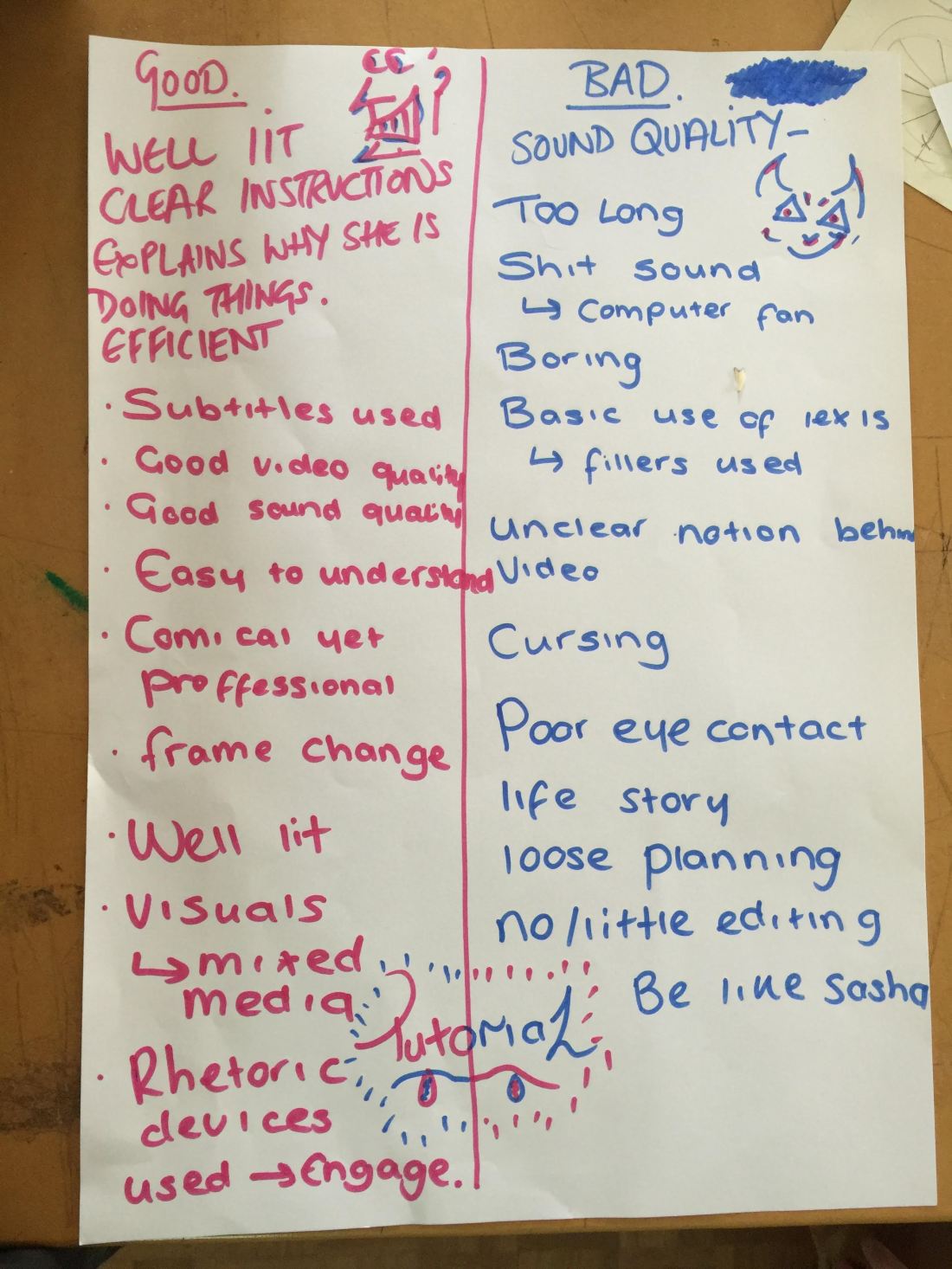
The sheet below showcase the further tasks produced during Week 9 with the class adding comments on the best and worst tutorials they could find and broken it down into bullet for future reference with the individual Video Tutorials;

1

The research produced by myself for the Video Tutorial Project can be seen below;

Two Good Tutorials I researched=

The qualities that make ‘How to make an Electric Guitar from Cardboard’ stand out as a good quality video is the lack of vocal description and heavy reliance on visual footage showcasing the construction of said Guitar which stands out from the sea of tutorials of various subject matters that rely too much on the vocals of the content creator with low quality still images rather than an edited film with carefully chosen music which works just as well if not more so due to the lack of distractions and overload of information.

Show Maker, 2017. How to Make an Electric Guitar from Cardboard. Available at: <https://www.youtube.com/watch?v=X4G2ikmMPZ4&gt;
[Accessed 26 March 2019].
‘The EASY Background Remover Hidden in Photoshop!’ works as a good quality video in the sense of not being the stereotypical ‘click bait’ video despite its title as referred earlier in this paragraph with all the elements of a good tutorial present in clear vocal presentation of explaining the step by steps as well as provide the right editing transitions which is easy to the eye when viewing the tutorial

PiXimperfect, 2018. The EASY Background Remover Hidden in Photoshop!. Available at: <https://www.youtube.com/watch?v=2C9p23iffNA&gt;
[Accessed 26 March 2019].
Two Bad Tutorials I researched=

The video tutorial ‘Why Some Tutorials Are Annoying’ although is a well-made spoof it is however a perfect example of a stereotypical ‘clickbait’ video which I found in the proper photoshop tutorials suggestion list in YouTube which I feel is very misleading when initially viewed with no real techniques taught within the video itself despite it title suggesting otherwise.

There is also too much going on regarding locations of the footage and the narratives that played throughout which I will not replicate for my tutorial if I decide to further expand upon the theme of Spoof and Humour.

Sugar Zaza, 2016. Why Some Tutorials Are Annoying. Available at:
<https://www.youtube.com/watch?v=9bUtZzi6hag&gt;
[Accessed 26 March 2019].

like ‘Why Some Tutorials Are Annoying’, ‘How NOT to make an Electric Guitar (The Hazards of Electricity)’ follows the trope of being a ‘click-bate’ video to gain views rather than educate with its quality being lower than “Why Some Tutorials Are Annoying’ due to the focus being on the individual rather than creating the faulty guitar itself with the video and sound quality varying throughout rather than holding a clear consistency throughout which will not be replicated for my Final Video Tutorial (The clear step by step of producing the Guitar in a Deadpan fashion would’ve linked the video more to the Spoof Genre that it tries to mimic).

ElectroBOOM, 2013. How NOT to Make an Electric Guitar (The Hazards of Electricity). Available at:
<https://www.youtube.com/watch?v=TwIvUbOhcKE&gt;
[Accessed 26 March 2019].

These examples of tutorials researched ‘Above’ will dictate the how my final five-minute tutorial video will play out from Week 9 to 12 during the second semester.


Four Initial Photoshop Effects that were considered for the Video tutorial=

BLOG.SPOON Graphics, 2012. How To Create a Movie Style Photo Effect in Photoshop. [online] Available at:

<https://blog.spoongraphics.co.uk/tutorials/how-to-create-a-movie-style-photo-effect-in-photoshop>

[Accessed 26 March 2019].

Nearly Five Minutes saying step by step for ‘Movie Style Poster’ out load


NALDZ GRAPHICS, 2002. Turn an Ordinary Photo into an Oil Painting in Photoshop. [online] Available at:

<https://abduzeedo.com/super-cool-watercolor-effect-10-steps-photoshop>

[Accessed 26 March 2019].

Four Minutes approximately for saying step by step for ‘Oil Painintg in Photoshop’ out load


WeGraphics, 2012. Photoshop Quick Tip: Create a Dragan Style Portrait Effect in 5 Steps. [online] Available at:

https://we.graphics/blog/photoshop-quick-tip-create-a-dragan-style-portrait-effect-in-5-steps/

[Accessed 26 March 2019].

Two minutes aproxiamately for saying step by step for ‘Dragan Style’ out load


Abduzeedo, 2009. Super Cool Watercolor Effect in 10 steps in Photoshop. [online] Available at: <https://naldzgraphics.net/oil-painting-effect-in-photoshop/>

[Accessed 26 March 2019].

More than five minutes (almost six) for saying step by step for ‘Watercolour Effect’ out load

I chose the ‘step by step’ of ‘ Turn an Ordinary Photo into an Oil Painting in Photoshop’due to it filling out the criteria of being enough to fill a video from five minutes and beyond as well as being the most practical for to produce while hopefully also retaining the audience’s attention who will watch said video (Development Screenshots will be posted showing experimentation before starting tutorial).

Original site used to find tutorials can be see ‘Below’;

Speckyboy, 2018. 50 Fantastic Photo Effect Tutorials with Photoshop. [online] Available at:

<https://speckyboy.com/photoshop-photo-effect-tutorials/>

[Accessed 26 March 2019].

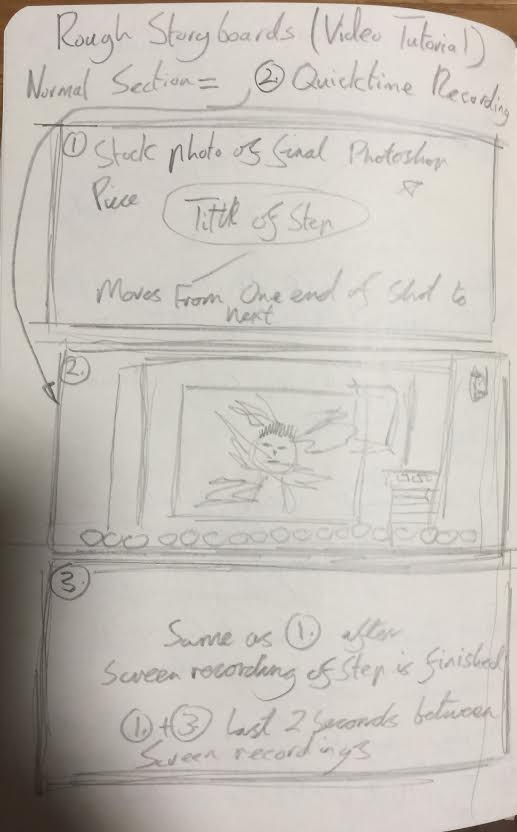
(Pre-Production) Storyboard and Mind map below showcase the basic step by step of the Video Tutorial I will create over the next few weeks;

unnamed[1].jpg

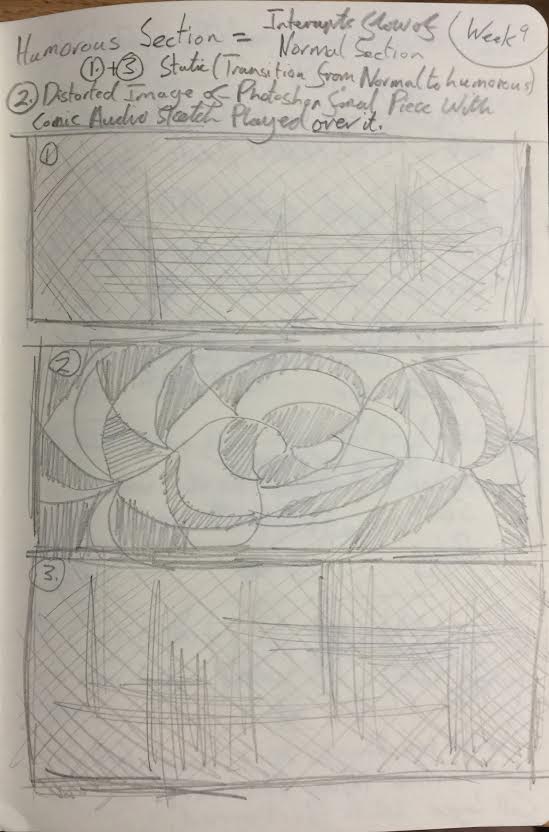
Notes bringing together base structure for ‘Humorous’ section of Video Tutorial if there is time or need to produce it over the three weeks this project provides;


Screenshots below showcase the Photoshop Features referred to in my research put into practise through experimentation with my own photos;


Screenshots below demonstrating refined sound on ‘Cool Watercolour’ technique which I will perform for my tutorial over the next couple of weeks, Photo of ‘Ron Chao’ being the main subject for said tutorial;


Photos ‘Below’ showcase rough script for step by step on how to produce ‘Cool Watercolour’ affect in Photoshop. I will use this as a basis for the video tutorial


Select Photos seen Below in their original form before being tweaked for the Photoshop Affects that are presented and expanded upon earlier in this post (They are however tweaked on RAW Settings to be more presentable, this is the case for ‘0205’, ‘0216’ but I used the tweaked ‘0223’ photo for the Water Colour Affect;

‘Paper Parchment’ that will be used for the final tutorial (Below);

animated-old-parchment-paper-background-stop-motion_rnbcvf7y__F0000

Storyblocks video, 2019. Animated old parchment paper background, stop motion. [image online] Available at: <https://www.videoblocks.com/video/animated-old-parchment-paper-background-stop-motion-s3x0pzxyirivxbq4&gt; [Accessed 28 march 2019].


The link below showcases the website used for the brushes I applied for the ‘Cool Watercolour Effect’;

Brusheezy, 2019. Real Smoke Photoshop Brushes. [online] Available at: <https://www.brusheezy.com/brushes/1830-real-smoke-photoshop-brushes>%5BAccessed 28 march 2019].


Further Development of Rough and Final Storyboard which will be presented to the group the Tuesday in Week 10 (Below):

1
‘Straight’ Rough Plan
2
‘Humorous’ Rough Plan
4
Final Pencil Drawn Storyboard (Contains both ‘Straight’ and ‘Humorous’ plan layouts).


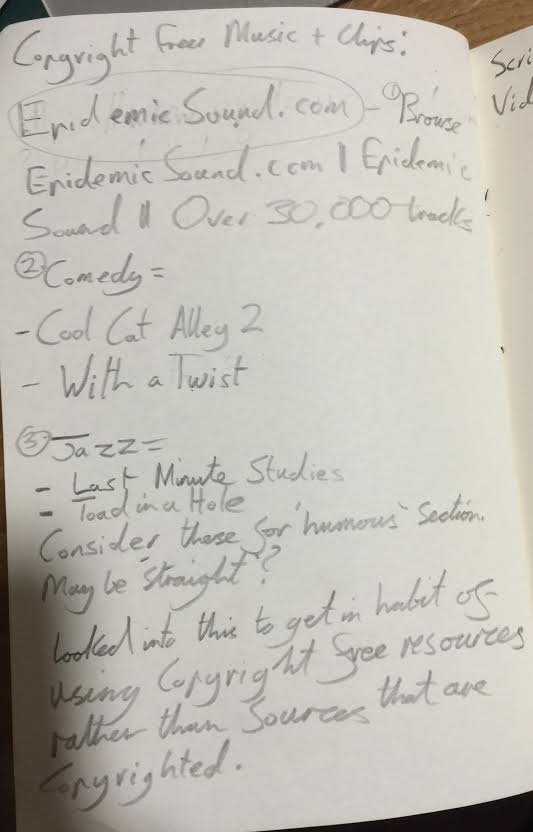
Screenshot ‘Below’ also showcases rough research in ‘Copyright Free’ music which could be included in both the ‘Straight’ and ‘Humorous’ sections of the Video Tutorial I will  produce;

3


Screenshot/Photo below showcase early development of ‘Humorous’ Script, I decided to write the rest of the scrip on a Word Document;

0[5]

After recording myself performing the script for ‘Draft 1 on my dictaphone’, it lasted for 10 minutes and 34 Seconds. Further Editing will be applied to Script which will be read out by myself in front of the Dictaphone from Media Services (Read out lines for characters separately to keep consistency within the narrative playing throughout Video Tutorial).
Cast (List of Characters);
• Reginald Lincolndale (Upper Class Voice)
• George (Northern Accent, Yorkshire?)
• Armandia (Female, Slightly High Pitched)
• Geoffrey (Low/Deep voice)
• Cecil (Nasal voice)
• Gerald (Cheeky Voice ‘Ollie Ollie’ sort of voice)
I’ll put on different silly voices and see which one will match up to the characters typed up ‘Above’.
‘Beginning of Video Tutorial’
Reginal Lincolndale; Good Afternoon Class! Let’s see what you sad bunch weedy gits, Trollops and everything else in the spectrum the modern age demands the likes of me to remember, have produced in the last week or so.

Reginald Lincolndale; First things first, the register, Geoffrey

Geoffrey; Here Sir!

Reginald Lincolndale; Gerald!?

Gerald; Aye

Reginald Lincolndale; No! your not here to answer with single letters from the alphabet, in my presence use the proper words of British English, now Gerald

Gerald; Afternoon m’lord Reginald Lincolndale

Reginald Lincolndale; That’s better, you little creep, could’ve spoken in broken Latin and still have no integrity, now Armandia!?

Armandia; Here m’lord Lincolndale

Reginald Lincolndale; Wonderful, Cecil!?

Cecil; Good to see you recover from your Mental Breakdown from the week before Sir!

Reginald Lincolndale; SHUT UP!! And George

George; Alright

Reginald Lincolndale; Seems it only you five that has bothered to attend, what’s the matter with everyone else?!

Gerald; Halfway through each of their tasks linked to stories you recommended the week before sir

Armandia; Mini-arsol is currently in the middle of the Pacific Ocean

Cecil; Harry’s in police custody

George; And Samantha attempted to set up a homegrown terrorist organization to be up there with the big boys, as far as I know she’s playing Russian roulettes at some point this week to make up for the organization’s insufficient funds.

Reginald Lincolndale; Alright, alright, I didn’t ask any of you to go on these little epic journys of failure and degeneracy across the globe, all I asked for was for you lot to write and READ out your short story to me!

George; Want to know about anyone else’s absence?

Reginald Lincolndale; Honestly, I don’t care as long as you five don’t waste my time!

Reginald Lincolndale; Now you! Armandia! Whats your Story!

Armandia; Hmhm ‘Ive got a Lovely bunch of Coconuts, there they are a’standing in a row
Big ones, small ones, some as big as your head
“Give ’em a twist, a flick o’ the wrist”
That’s what the showman said!’

Reginald Lincolndale; Hold on! NO!, Stop that! That’s not an original story, why are you nicking songs

Armandia; Thought it was funny

Reginald Lincolndale; Thought it was Funny, guess you thought you’d get away with it being an old song, presumed it was freed from the shackles of copyright.

Armandia; Sounds about right Sir.

Reginald Lincolndale; Well you just failed this module, that’s sounds about right! Now, What’s your story Cecil!?

Cecil; Hmhm, There’s a song that I recall My mother sang to me. She sang it as she tucked me in
When I was ninety-three. Ying tong ying tong Ying tong ying tong Ying tong iddle I po

Reginald Lincolndale; NO, NOO Cecil. What are YOU doing nicking songs from artists who passed this mortal coil, are you in league with Armandia

Cecil; Yeah, so what Bruv

Reginald Lincolndale; Well you, Bruv, have succeeded in pissing me off, therefore you fail this module, Now Gerald and don’t you sing ‘Why Don’t Women Like Me’ as you’re just stating the obvious of your miserable, charmless life, now start!

Gerald; Hmhmhm (Deep Breath) ‘Is this wretched demi-bee, Half asleep upon my knee, Some freak from a menagerie? No! It’s Eric, the half a bee, A fiddle de dum, a fiddle de dee
Reginald Lincolndale; ALRIGHT, Alright Alright (Sigh) I give you credit for robbing a song from an artist who still walks and talks, Unlike Armandia and Cecil however, you prove to be thicker than both those two combined. At least they stolen material from people who they think will not sue them. What have you got to say for yourself!?
Gerald; Not a lot Mate
(Load Slap)
Gerald; Ohh?!!! YOU Hit me AHH?!

Reginald Lincolndale; That, what you experienced, is me flexing my power granted by this university over lanky twits like you.

Gerald; I’ll sue you. Ah?!

Reginald Lincolndale; After class, then you can sue me, don’t you worry I’m ready for this battle you little yobo, funny how your colleagues aren’t speaking up for you are they.

Gerald; No comment Mate

Reginald Lincolndale; SHUT UP!

Reginald Lincolndale; Alright Geoffrey, be HONEST with ME, have you created an original story to tell today at this very moment, or are you going to mess me about and therefore ruin your chances of a good grade!

Geoffrey; I do Indeed M’Lord Lincolndale

Reginald Lincolndale; There you go, alright then, Grab my interest.

Geoffrey; Ok, I saw this stray dog…

Reginald Lincolndale; Oh, for god’s SAKE are you even trying to catch my attention Geoffrey?!

Geoffrey; What would you want me to say sir, I haven’t even begun?

Reginald Lincolndale; You only need to listen to what YOU just said for you to lose my interest, grab my ATTENTION, think about it, What scenario could not POSSIBLY happen to you even if you have the chance. A FICTIONAL Scenario, I don’t care if your ‘Real-Life’ story involves you euphemising the stray dog with medication drugs or a pistol, it still wouldn’t interest me. NOW, GRAB MY ATTENTION!

Geoffrey; Alright… I met this lady of the night

Reginald Lincolndale; Ah, that’s better, tell me more…

(Sketch would end ‘Above’ and begin again ‘Below’ when two QuickTime edited footage has played its course)

Reginald Lincolndale; ‘Sigh’ you, Geoffrey, are waste of skin and effort on your mums’ part when you were conceived all those years ago. Losing your innocence is NOT A STORY, whether its fictional or not.

Geoffrey; Could be worse ‘M’lord’

Cecil; Geoffrey’s half-priced lover could’ve been your Mum

Reginald Lincolndale; ‘My MUM’, well there’s two points contradicting what you just said, one my mums not fictional, and TWO, even if Geoffrey is right in his claims she would certainly not be half priced, she’s good quality as I’m not an accident!

Armandia; Unlike you Sir

Reginald Lincolndale; WHATS THAT SUPPOSED TO MEAN, I GET PAID VERY WELL!

Gerald; That’s good to hear sir

Reginald Lincolndale; Too right its GOOD!

Cecil; And by looks of it the Security Camera has picked up all the lesson so far

Reginald Lincolndale; Nah don’t you lot worry about that sodding camera, I dismantled it back in the first semester, this Uni might have higher powers I am the power

Armandia; You don’t say sir

Reginald Lincolndale; SHUT UP!! NOW, Finally George, little Northern George, whose accent is as dodgy as…

Gerald; You mums career choices

Reginald Lincolndale; OOIIII!! As I was saying, as dodgy as my broken pencil

Cecil (All five characters saying it together?); Whoooahhh what a comeback sir

Reginald Lincolndale; Coming from the goits and tarts who can only make jokes about my ‘mum’ so as I said before ‘shut your face’!

Armandia; No that’s first time you said that

Reginald Lincolndale; SHUT UP!

Reginald Lincolndale; NOW on with your story and George and we will break up

George; Alright Mate

Reginald Lincolndale; CAFEFUL GEORGE! (whispering)

George; Alright, I went down the street one day

Reginald Lincolndale; YES

George; I saw legs popping out a bin

Reginald Lincolndale; YES

George; Then they briefly disappeared again

Reginald Lincolndale; Yes

George; The bin itself sprout legs

Reginald Lincolndale; YES

George; The bin ran across the street

Reginald Lincolndale; YES

George; The bin fell over mid-jog

Reginald Lincolndale; YES

George; An old person fell out the bin

Reginald Lincolndale; YES

George; That’s about it Mate

Reginald Lincolndale; That’s about it Mate? THAT’S ABOUT IT MATE!!

George; Don’t see what wrong with it, quite a harrowing experience I thought

Reginald Lincolndale; WHATS WRONG WITH IT INDEED, HARROWING EXPERIENCE?! Do you want to explain what you done wrong or should I!

George; Go ahead mate, earn your pay

Reginald Lincolndale; DETAIL, there’s no detail to your story in Location, Character or Descriptions of the environment around you, you don’t even make yourself sound interesting and you’re the main teller of this story

George; So

Reginald Lincolndale; SO?! DETAIL IS EVERYTHING

George; Not always, thought I was being subtle and multi-layered in allowing the audience free interpretation over my short story.

Reginald Lincolndale; SUBTLE AND MULTI-LAYERED MY ARSE!! These are the questions you should ask yourself George!

Reginald Lincolndale; WHY ARE YOU THERE? WHAT HAVE YOU LEARNED? WHAT WAS THE REST OF THE DAY LIKE BEFORE AND AFTER THE INCIDENT WITH THE BIN? WHAT COLOUR WAS THE BIN? WAS THERE A MAGICAL DEITY THAT CAST A SPELL OVER THE CONTAINER CONCEILING THE OLD PERSON? ARE THEY AN OLD BOY OR OLD DEAR?! ARE THEY ALIVE OR DEAD? IF THE LATER THEN HOW DID THEY DIE? IF THE FORMER WHAT DID THEY THINK YOU STARING AT THEM DOING BUGGER ALL?!
ALL THIS AND MORE THAT COULD’VE MADE YOUR STORY THAT BIT MORE ENTERTAINING AND EVEN BELIEVABLE!!!!

George; That’s was a good lecture, well done (Sarcastic)

Reginald Lincolndale; Glad to hear you learnt something for a change!

George; Also, you know that Mac over there that’s turned on

Reginald Lincolndale; Yeah what about it? What’s is relevance to our conversation?

George; Been recording you mate, that Little Mac there is going to give you the Sack

Reginald Lincolndale; Hahaha, you and everyone else are having a laugh

George; No, we’re not mate

Reginald Lincolndale; Right, in that case, no more messing about, I’ll pull out this pistol, shoot the offending MAC and detonate the grenades that are currently around this classroom, any last words you little Twats. You George

George; Bit dramatic mate

Reginald Lincolndale; SHUT UP!

Reginald Lincolndale; YOU, GEOFFREY, any last words

Geoffrey; Your Mum

(GUN Shot)

‘End of Video Tutorial’


Rough Plan for next few weeks can be seen ‘Below’;

(Production) The script I will use for the recordings on QuickTime Player on the Mac while performing step by step. Feedback from group after presentation during Week 10.

(Post-Production) Screenshots of ‘Premier Pro’ Process regarding “Text, Editing, Music”etc. for final editing of Video Tutorial during Week 11.